CMN Mission Operations · cmnos.com

Mission Operations, section by section

What each part of the system does, and how it works underneath. Twelve sections are in the side menu; the other four open from wherever they are needed and are easy to miss — so they are here too.

ADMINISTRATOR · CMN OFFICE · FUNDRAISER = who can see it NOT IN THE MENU = opens from somewhere else EXPLAIN = the why behind what isn't obvious ·

Day to day

8 sections · daily use

What the office opens every day. In the menu under Operations.

01

Dashboard

The first screen after signing in

Every role

Shows at a glance how large the contact base is and where the build of the system stands.
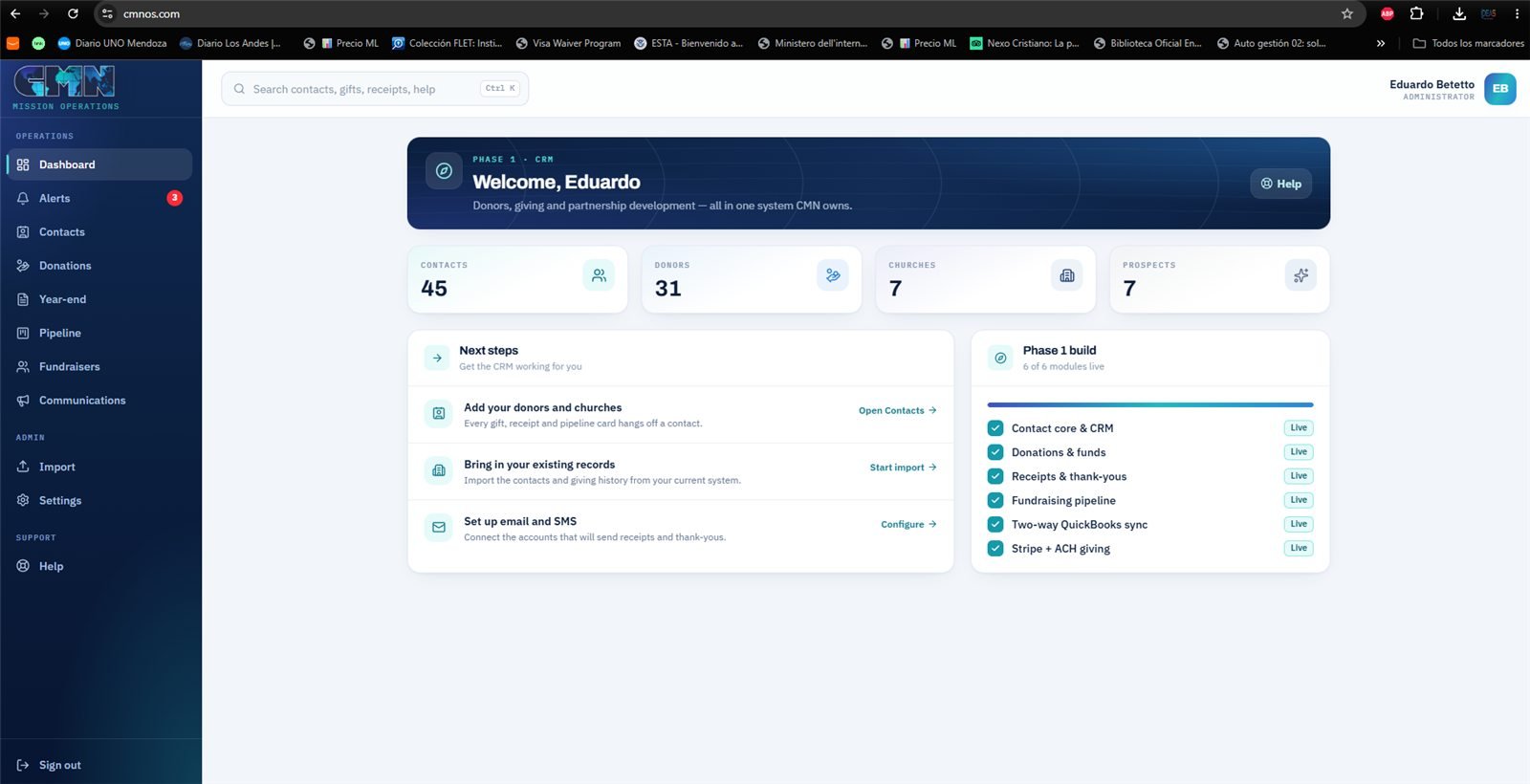
Dashboard — the size of the contact base and the status of the six Phase 1 capabilities.
  • Four numbers that lead to their section: Contacts, Donors, Churches and Prospects.
  • A Phase 1 build panel with the six capabilities in the agreed scope — contacts and CRM, donations and funds, receipts and thank-yous, the fundraising pipeline, Stripe and ACH giving, QuickBooks sync — and the status of each.
  • Next steps: what comes next, so nobody has to ask where the project stands.
02

Alerts

What someone needs to look at

AdministratorCMN Office

Not a metrics board: only things that need a person to act land here. If it is empty, nothing is waiting.

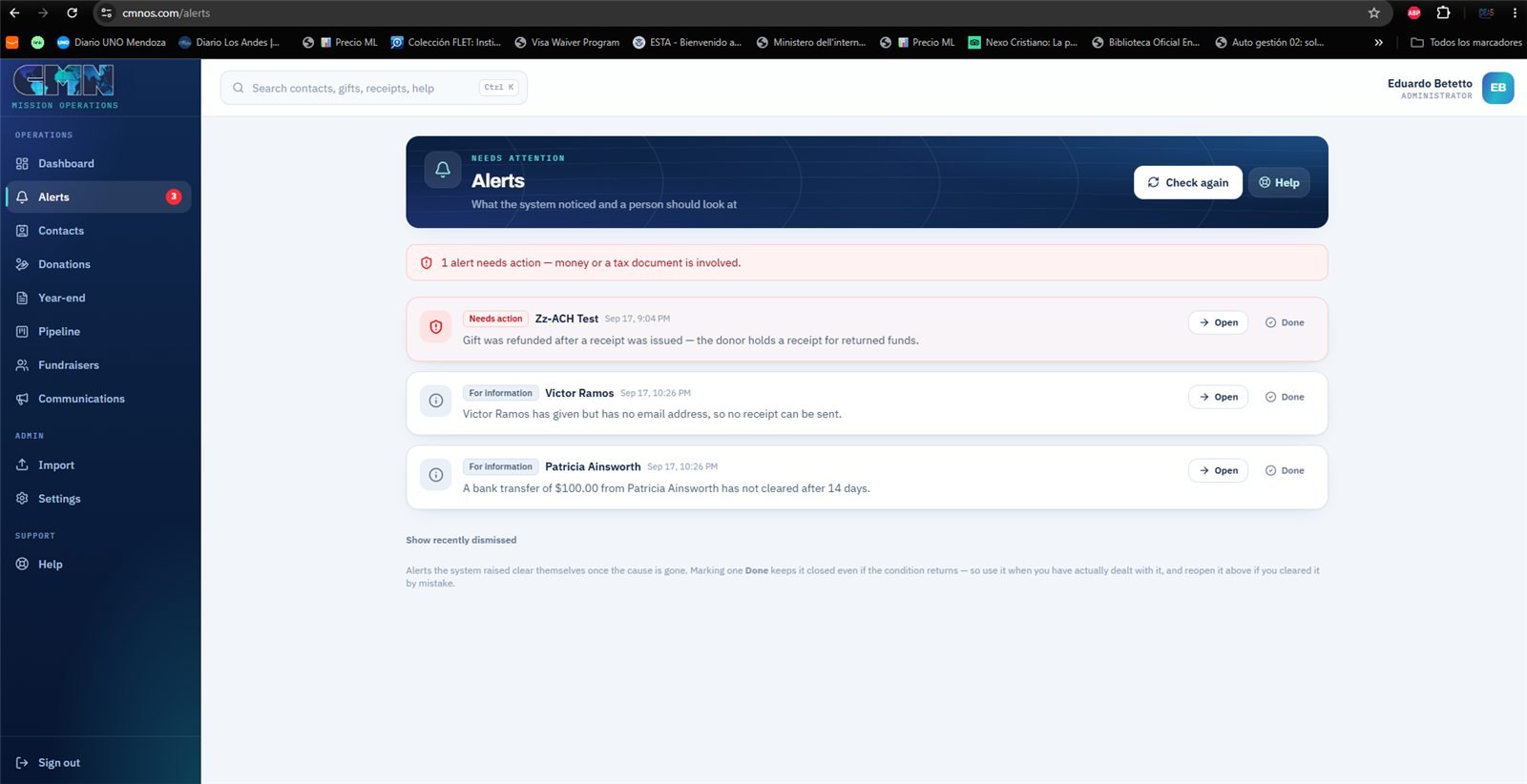
Alerts — three open items: a critical one for money returned after the receipt, and two informational ones.
  • The system checks on its own and raises four things: a receipt that could not be sent, a gift QuickBooks rejected, a bank transfer still not cleared after ten days, and a donor who gave but has no email — and without an email there is no receipt for their tax return.
  • There is a fifth, critical one: money returned after the receipt went out. The donor now holds a tax receipt for money they no longer gave, and telling them is the one thing the system cannot do alone.
  • Alerts the system raised close themselves when the cause goes away. Done closes one even if the condition comes back, so use it when the problem is truly solved.
ExplainMoney returned after the receipt

What happened

A gift came in, was charged, and the receipt went out. Afterwards the money came back. The problem is the order: between the receipt and the return, a tax receipt is out there for a gift that no longer exists.

Why it matters

That receipt is what the donor uses to deduct the gift. If they use it, they claim money they did not give — and CMN is the organization that issued the receipt.

The three ways money comes back

  • Refund — CMN returned the money, or the donor asked for it.
  • Bank return — the tricky one. A bank debit can clear, look paid for days, and only then bounce: closed account, insufficient funds, or the account holder disputes it.
  • Chargeback — the donor disputes the charge with their card.

What the system does by itself

  • Marks the gift Refunded and takes it out of every total.
  • Leaves it off the year-end letter, so if that letter goes out later, it is already right.
  • On the next sync, voids the receipt in QuickBooks. Voids, not deletes: the number stays in the books marked void, which is what an accountant expects to find.

What a person has to do

Write to the donor. The receipt email is already in their inbox and cannot be recalled: they need to hear that the gift was returned and that the receipt number no longer stands.

Why this alert never closes by itself

Other alerts disappear when their cause does. This one is marked so that only a person can close it with Done, because the condition that raised it never stops being true. If it closed itself, it would close without anyone having told the donor. That it stays is the point, not a defect.

03

Contacts

One directory for everyone

AdministratorCMN Office

Every person and organization CMN knows, in one place. One person, one record — even if they give, pastor a church and travel with a team.

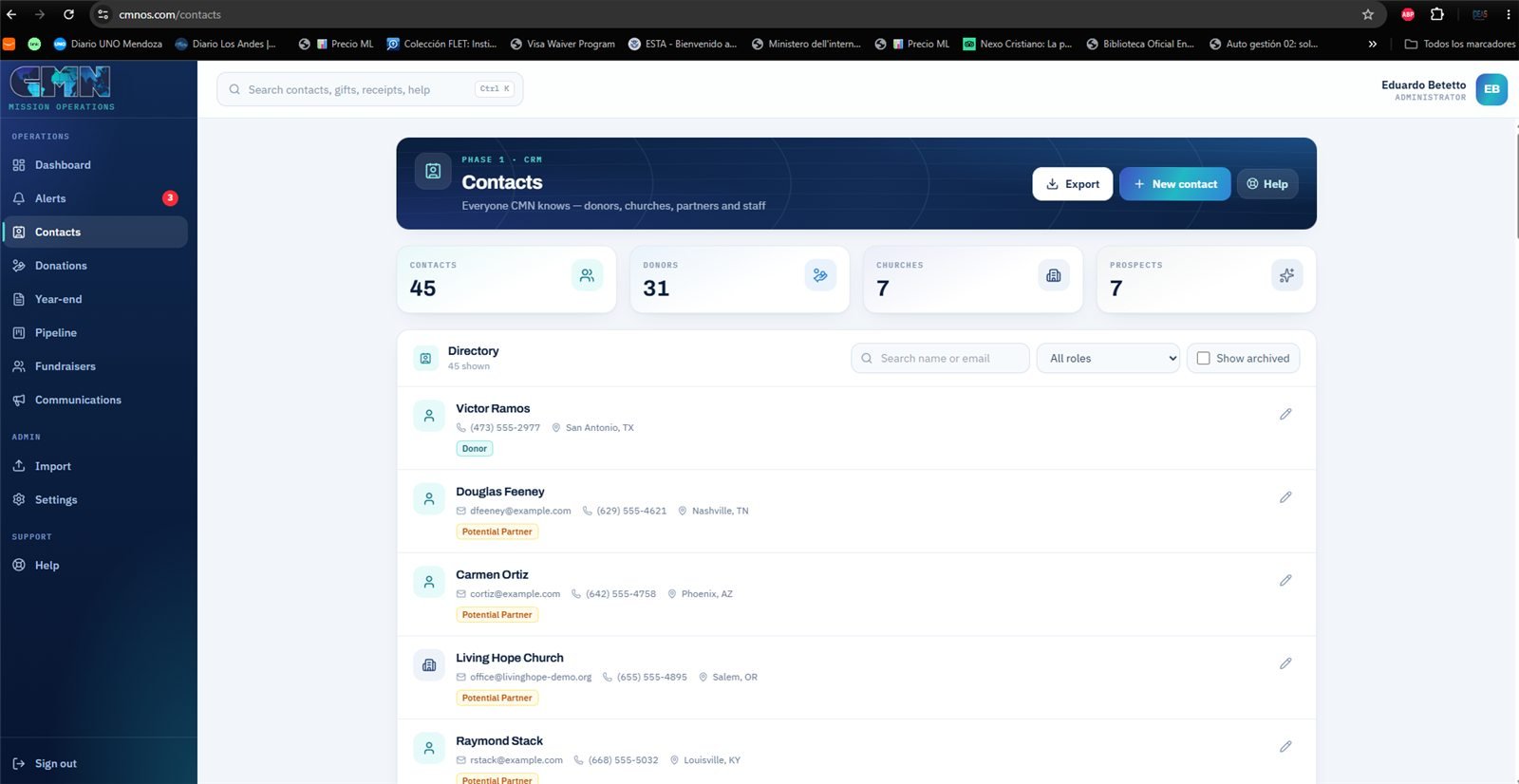
Contacts — the directory with role tags and the filter by role.
  • Each contact carries role tags, several at once: Donor, Church Donor, Missionary Supporter, Potential Partner, Lapsed Donor, Fundraiser, Pastor, Staff. Those tags are what later build the groups for email campaigns.
  • A contact can be a person or an organization — a supporting church, for example.
  • The list search works word by word: robert callahan finds Robert Callahan, and grace dallas finds Grace church in Dallas.
  • Contacts are archived, never deleted: their giving history has to stay whole for receipts and year-end letters. Archived contacts have their own Archived tab, with a count, and can be restored from there.
  • On the mailing list decides who receives campaigns. Receipts go out either way.
  • Merging duplicates combines two records into one without losing a single gift, when the same donor came in twice with the name written differently. The system suggests the pairs it finds, and Merge with… on the record merges the ones it could not.
ExplainWhat merging duplicates does

Why they happen

Someone gives online with their email, and the office already had them entered by hand with another email or a differently spelled name. The result: two contacts for one person, and their giving history split in two.

Two ways to find them

  • The system suggests them. When it detects likely pairs — same email, same name — a notice appears at the top of Contacts.
  • Merge with… on the contact's record, for the ones the system cannot guess: "Bob Smith" and "Robert Smith Jr.", or a church entered under two names. Find the other record by name and choose which one to keep, seeing how many gifts each has.

What the merge does

  • You choose which record stays. All gifts, pipeline cards and role tags move to it; the two records' roles are combined.
  • The other one is archived, not deleted, so anything that refers to it keeps working. The Archived tab says who it was merged into.

Two rules

  • A contact with a login to the system cannot be the one absorbed: keep that one and merge the other into it.
  • If both were linked to QuickBooks, an alert says the two customers need merging there as well.
04

Donations

Gifts and receipts

AdministratorCMN Office

Every gift, the fund it was designated to, and where it stands with QuickBooks. This is where tax receipts are issued.

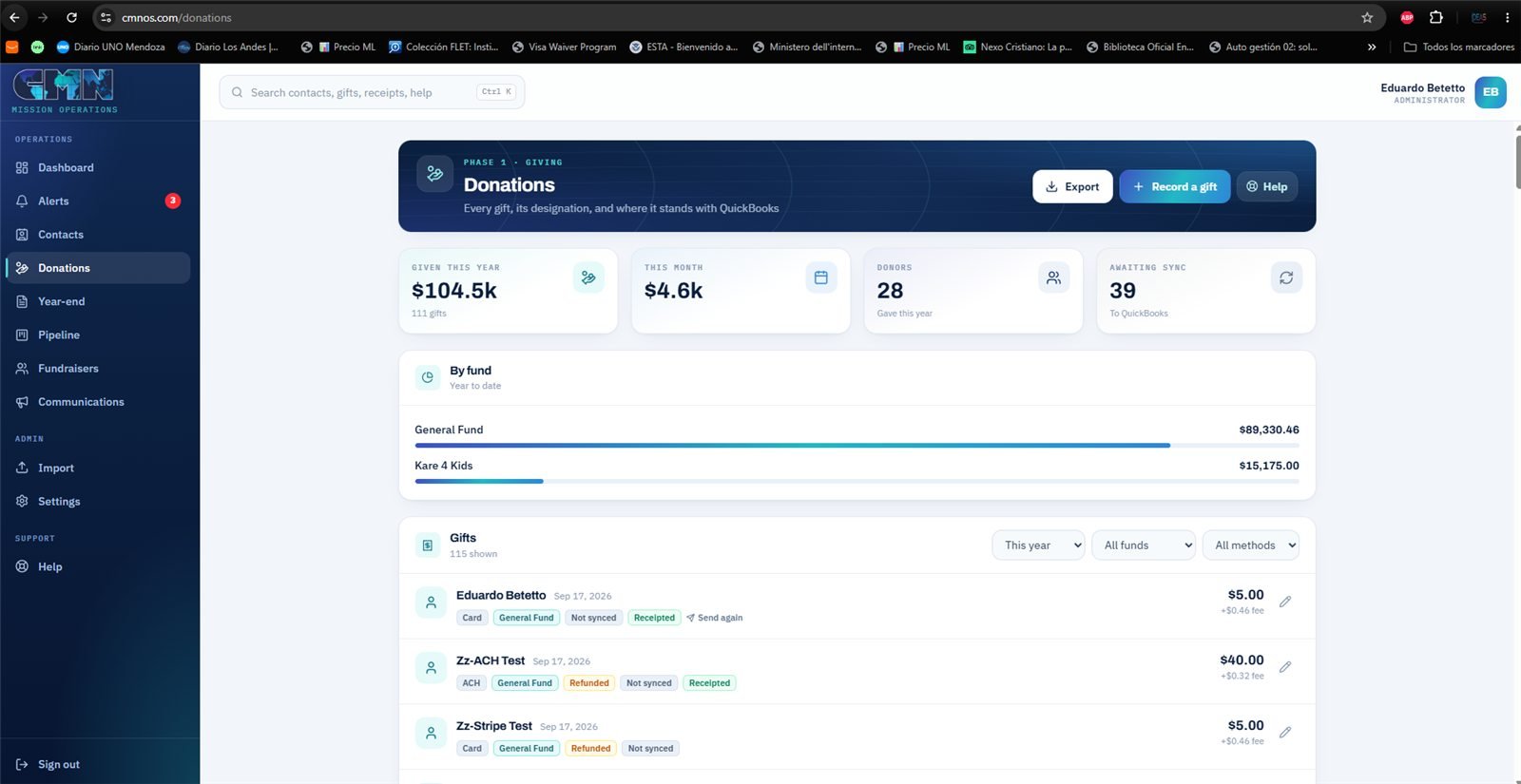
Donations — the year's totals by fund and the list of gifts with their status and receipt.
  • Checks, cash, gifts in kind and anything that did not come through the giving page are entered by hand. Online gifts arrive by themselves, with their receipt already sent.
  • If the person who wrote the check is not in Contacts yet, the same search offers to create them right there, without leaving the form — and warns if that email already belongs to another contact, so no duplicate is made.
  • Four statuses: Completed (the money is here), Pending (a bank transfer on its way), Refunded and Failed.
  • The receipt button appears only on Completed gifts. A pending or returned gift cannot be receipted, so the button is not offered.
  • Each receipt carries a sequential numberCMN-2026-000004 — and Send again reuses the same number, so a donor never ends up with two different receipts for one gift.
  • Filters by year, fund and payment method, and a button to export what is filtered to Excel.
Why the status matters

A receipt is a tax document. If it goes out before the money arrives and the transfer then fails, CMN has to ask the donor to give back a receipt they may already have used. That is why the system waits.

ExplainWhy a bank transfer shows Pending

A card is authorized on the spot: when the donor finishes, the money is there. A bank transfer (ACH) is not. The donor authorizes the debit and the bank processes it over three to five business days. Until then no money has moved — and it may never move, if the account lacks funds or the details were wrong.

While it is Pending

  • The donor right away receives a notice that their gift arrived and is being processed. Without it, someone who gave on Monday and hears nothing until Friday assumes it did not work — and sometimes gives again.
  • That notice is not a receipt, and says so: no number, no EIN, no tax statement. On their record it shows as Gift received — processing.
  • No receipt goes out.
  • Nothing is sent to QuickBooks.
  • It does not count in the year's totals.

When it resolves

The day the bank confirms, Stripe reports it and the gift becomes Completed on its own: the receipt goes out that same moment and the gift is queued for QuickBooks. If it fails, it becomes Failed and nothing goes out. Nobody has to remember to check.

If a transfer is still pending after ten days, it appears in Alerts so someone can find out what happened.

ExplainThe receipt number

Each receipt carries a sequential number with the year: CMN-2026-000001, 000002, 000003. The system assigns it at the moment the receipt is sent.

Send again does not create a new receipt

It resends the same document with the same number. If the donor's name or address was corrected, they get the corrected version, but it is still one receipt. The donor never ends up with two numbers for the same gift — exactly what would confuse whoever prepares their taxes.

If the gift is returned

The receipt is neither renumbered nor deleted. In QuickBooks it stays void with its number, so the series in the books has no gaps to explain to an auditor.

05

Year-end

Year-end giving statements

AdministratorCMN Office

The letter every donor needs in January for their tax return, with everything they gave during the year in one document.

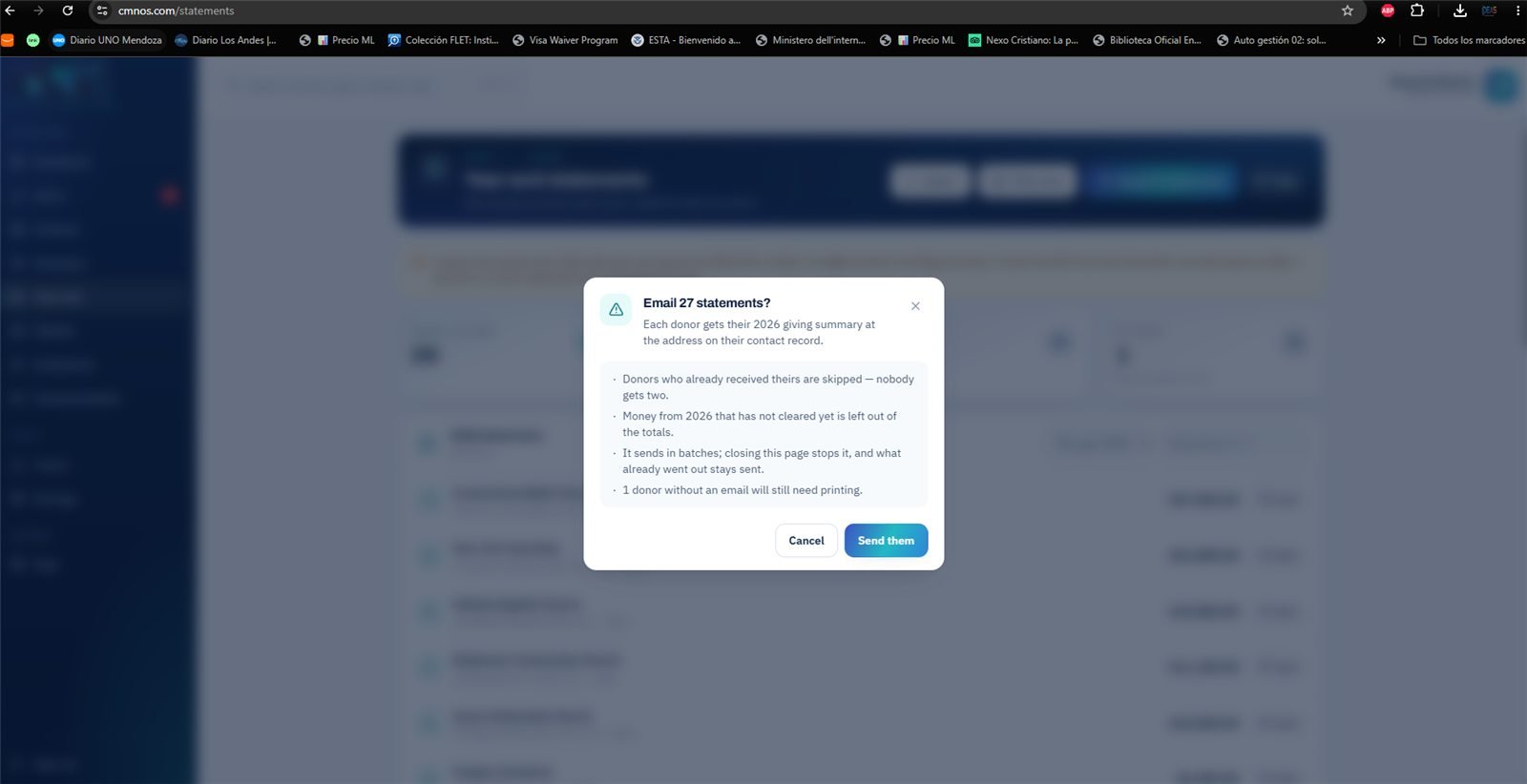
Year-end — before sending, the system says what it will do: skip anyone who already has theirs, leave out money not yet cleared, send in batches, and say how many donors will need a printed copy.
  • Gathers every completed gift of the year by donor. Returned gifts do not count.
  • Goes out by email to those with an email address, and for printing to those without — often exactly the older donors who most want it on paper.
  • The printed version is a personal letter with CMN's logo and details, ready to print or save as a PDF: one page per donor, with no blank pages in between.
  • Mark as mailed records the letters delivered on paper, with an undo. The list then separates what is still to go from what has gone, and the donor's record says mailed or sent.
  • A search finds one person in the list, and Send me a test sends the first letter on the list to your own inbox, without recording anything — to see how it will arrive before sending it for real.
  • Gifts in kind are listed in the letter but without a dollar value: the value of a donated car is stated by the donor, not by the organization.
ExplainWhy a gift in kind carries no value

When someone gives an item — a car, equipment, furniture — the year-end letter mentions and describes it, but does not put a price on it.

That is what the IRS asks: for a non-cash gift, the value is determined and claimed by the donor, not by the organization receiving it. If CMN wrote a figure, it would be certifying something it has no standing to certify.

So the system counts those gifts — the letter says how many there were — but does not add them up in dollars.

06

Pipeline

Partner development · from first contact to commitment

AdministratorCMN OfficeFundraiser

Following every relationship that is not a gift yet: who spoke with whom, how much is expected, and what has to happen next.

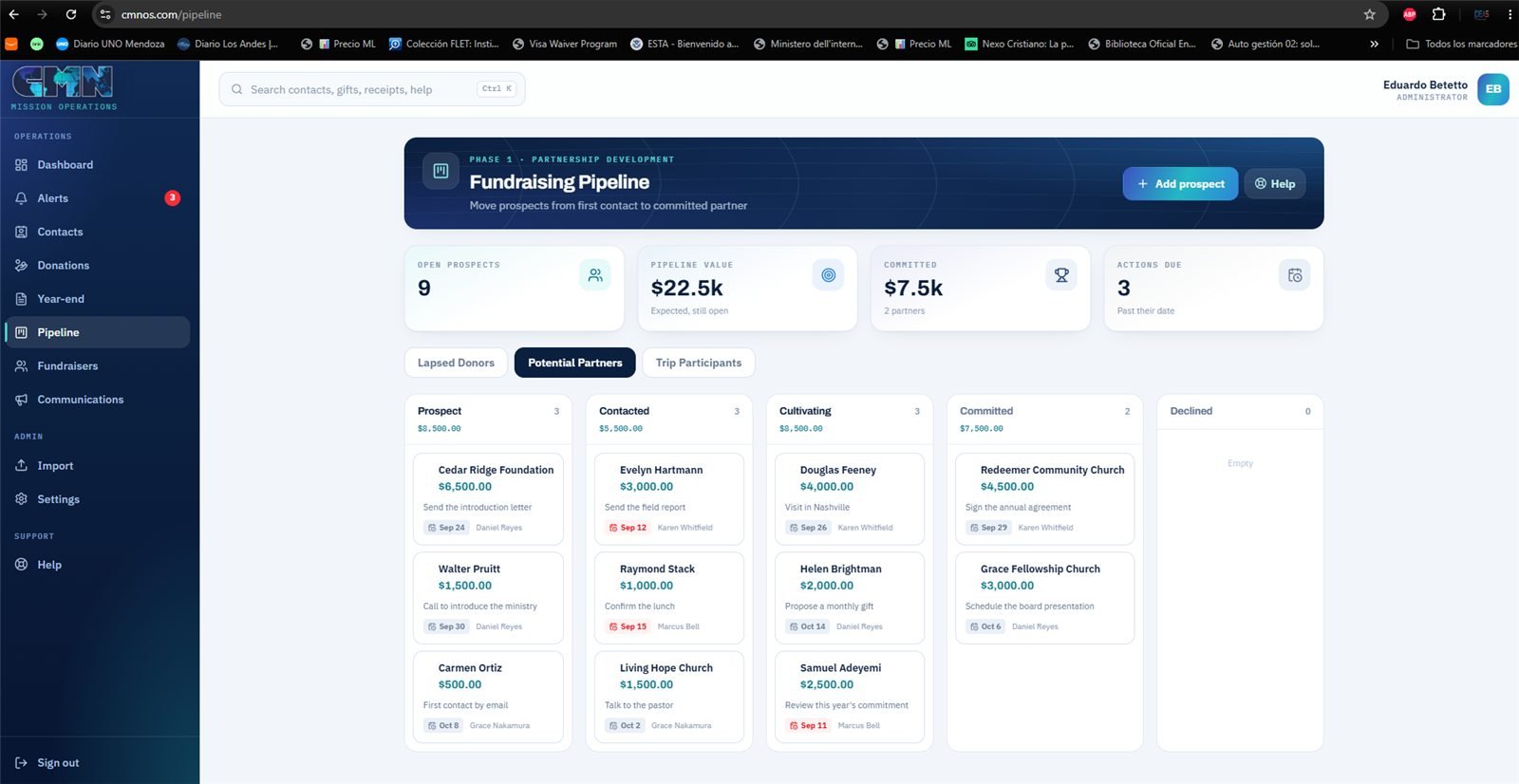
Pipeline — the potential partners board; in red, next actions already past their date.
  • A board by stages, with a card per prospect: expected amount, expected date, and the next action with its due date.
  • At the top, four numbers: Pipeline value, Committed, Expected, still open and Actions due — with those Past their date highlighted.
  • It is the only section a Fundraiser sees, and only with their own prospects. They cannot reach the donor base, donations or emails, and they do not add or remove prospects: the office assigns them.
07

Fundraisers

The team and their goals

AdministratorCMN Office

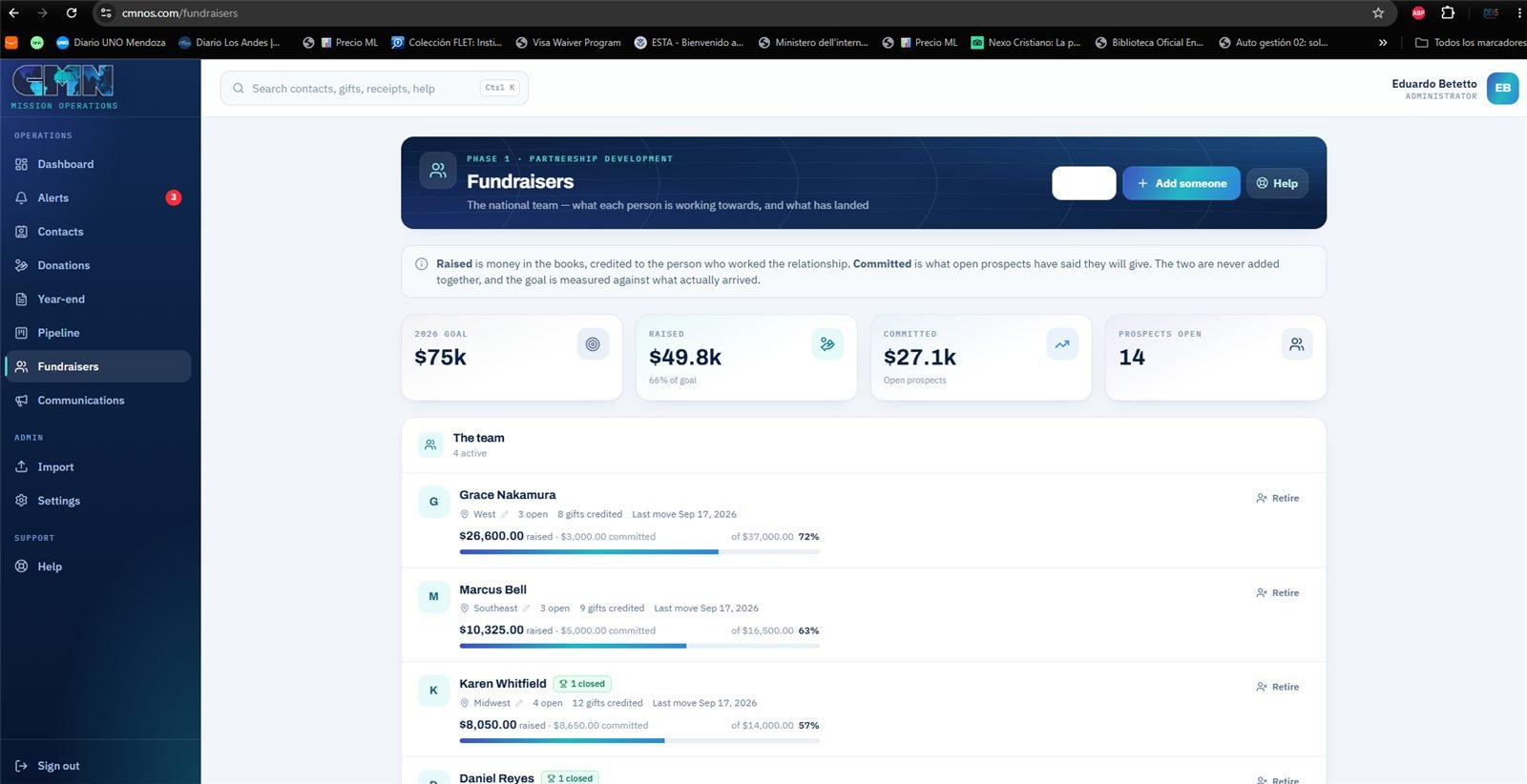
Who raises funds for CMN, and how each one is doing against what they set out to raise.

Fundraisers — each person with their goal, what they raised and what is committed, which are never added together.
  • Each fundraiser with their region, their open prospects, what is committed and what has actually been raised.
  • They can be retired from the roster without deleting anything: what they raised still counts in the organization's history.
ExplainWhy raised and committed are never added together

Raised is money that arrived, credited to the person who worked the relationship. Committed is what open prospects said they will give.

Adding them looks natural and is the classic mistake of fundraising dashboards: a commitment is a promise, and some promises are not kept. Added together, the goal would look reached with money that does not exist yet — and the team would ease off exactly when it is needed most.

So the goal is measured against raised only. Committed is shown beside it, to know what is on its way, but it does not fill the bar.

08

Communications

Email campaigns to groups of donors

AdministratorCMN Office

Write a message once and have it reach a whole group, each person greeted by name — now, or on the day and at the time you choose.

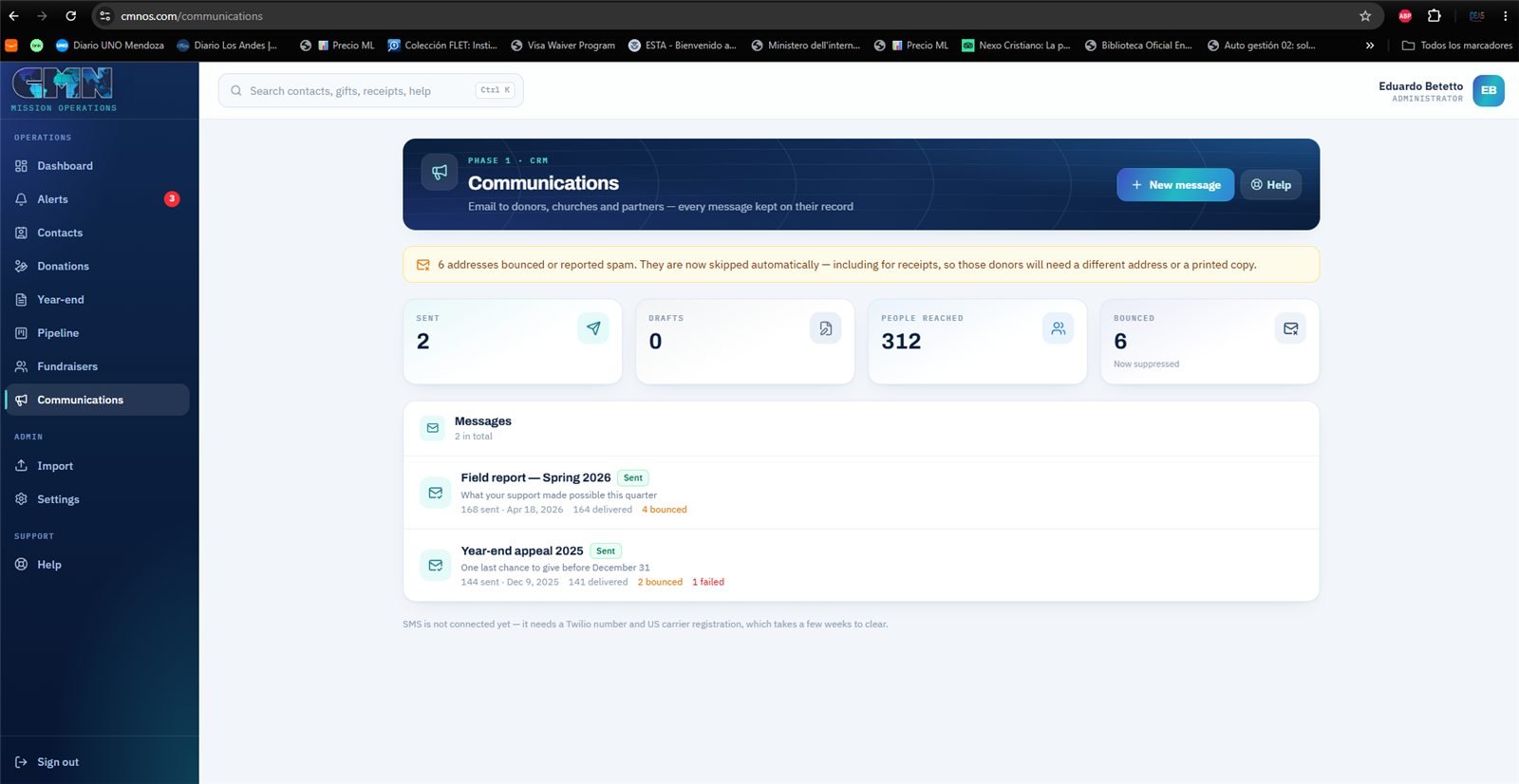
Communications — the campaigns sent, and the notice about addresses suppressed after bouncing.
  • Written like any email, no code: bold, headings, lists, links and photos, which are resized for email on their own. The Name button greets each person by name, and Preview shows the whole email — logo, footer, sender — as the first real person on the list will receive it.
  • The group is built by role, by who gave since a date or to a fund, and under More filters by the questions a development office asks: who gave last year but not yet this year, who gave at least an amount, who lives in a city or state, and one fundraiser's donors.
  • See who lists everyone by name before sending. Leave out takes someone off this send, Also send to adds someone by hand, and Only people I choose sends only to the people picked. Anyone who will not receive it is shown with the reason: no email, not on the list, or bounced before.
  • From and Replies go to: an appeal can come from Pastor Jay, with the replies going to him.
  • Later schedules it for a day and time; it goes out on its own, even with nobody signed in. Send me a test sends it to your own inbox first.
  • The copy icon turns an earlier campaign into a new draft with the same text and the same people: this month's update starts where last month's ended.
  • Every campaign sent has its report by name: delivered, not yet confirmed, not delivered with the reason, and — if it is turned on — who opened it and who clicked a link.
  • It only reaches contacts on the mailing list. Anyone who unsubscribes stops getting campaigns — but still gets their receipts, because a receipt is not marketing.
  • Every send is recorded on the contact's record, so before calling someone you can see what they were sent and when. To write to one person, use the Email button on their record.
  • An address that bounced or marked the email as spam is suppressed, and the system never writes to it again. That is what keeps CMN's email landing in inboxes.
ExplainUnsubscribing is not the same as being suppressed

Two things that look alike and that the system treats differently on purpose.

Unsubscribing

The donor clicked the link at the foot of a campaign. They stop receiving campaigns, but still receive their receipts: a receipt is not marketing, it is the record of their gift and they need it for their taxes.

A suppressed address

The email bounced — the address does not exist — or the donor marked it as spam. The system never writes to it again, not even receipts.

Why so strict

Gmail, Outlook and the rest keep score on every sender. Continuing to send to addresses that bounce or complained makes CMN's email start landing in spam for everyone — including the receipts of donors who want them. Suppressing one protects all the others.

What to do with a suppressed donor

Their record says so at the very top. Get another address, or mail them the receipt on paper.

ExplainWhat happens to a scheduled campaign

The list is made at sending time

Not when it is scheduled. If a campaign is scheduled on Friday for Tuesday and someone unsubscribes on Monday, it does not reach them on Tuesday. The same the other way round: someone who gives over the weekend and joins the group receives it.

Who sends it

A clock inside the database checks every minute whether anything is due. When the time comes, it builds the list and sends it in batches. Nobody needs to have the system open, or a computer on.

Whose time

The time chosen is the time on the computer of whoever schedules it. If that person is in another time zone — Eduardo, working from Buenos Aires, for example — the window also shows what time it will be for CMN: 9:00 in Buenos Aires is 7:00 in Texas.

Changing your mind

Until it goes out, a scheduled campaign cannot be edited, but Cancel the schedule turns it back into a draft with nothing sent. Then correct it and schedule it again.

ExplainIf a send stops halfway

A campaign to 300 people goes out in batches of 100. If the window closes or the internet drops halfway, what already went out is neither lost nor repeated.

Why

Before the first email leaves, the system writes down every recipient as waiting. Each batch marks its own people before sending to them, so two sends running at once can never send the same person the message twice.

What to do

The list shows the campaign as Stopped before it finished. Open it, and Resume sending sends only to the people still waiting.

The rare case

If it is the server that goes down right while a batch is sending, there is no way to know whether those emails left. The system does not resend them: it closes them as Failed with the note it may or may not have arrived, so someone can confirm with that person. An honest notice is better than a duplicate email.

Opens and clicks: CMN's decision

The system is ready to record who opened each campaign and who clicked a link, but that only arrives if CMN turns on tracking in Resend, the service that sends the emails. It is a privacy decision about donors. And opens are approximate: Apple Mail opens every message on its own. Clicks are reliable.

Administration

4 sections · for whoever sets things up

Used now and then, but they decide how everything else behaves. In the menu under Admin and Support.

09

Import

Bring in contacts and gifts from Excel or CSV

AdministratorCMN Office

Bring years of history in from a spreadsheet without typing anything, and without risking the database if the file is wrong.

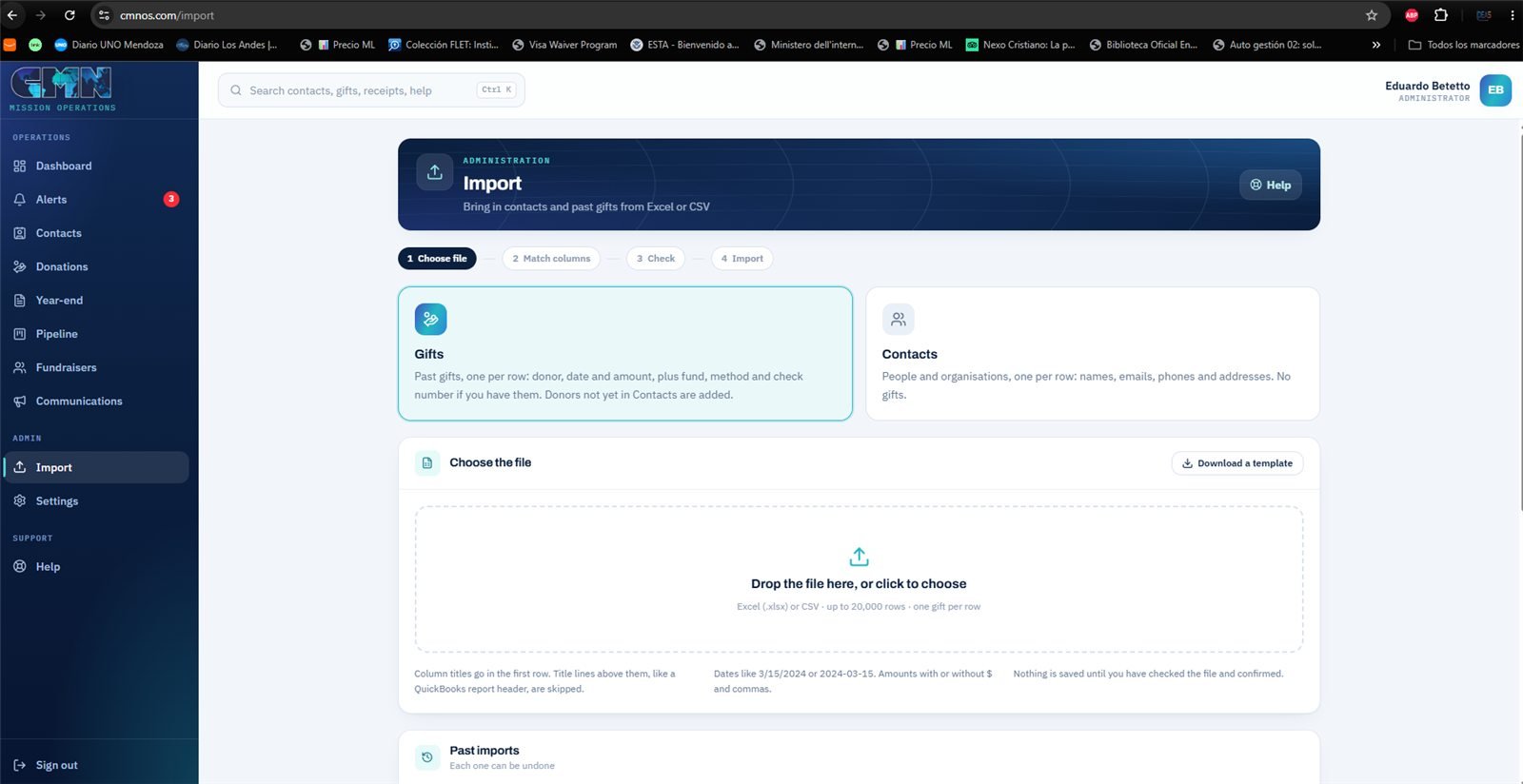
Import — the first step: choosing whether the spreadsheet holds gifts or contacts.
  • Four steps: upload the file, say which column is which, review the trial run, confirm.
  • The trial run runs exactly the same process as the real import and then undoes it. What it says will happen is what happens — it is not an estimate.
  • It can fill in missing details of contacts that already exist: if a contact has no phone and the spreadsheet has one, it is added without overwriting anything already there.
  • Imported gifts can be marked "already in QuickBooks", so they are not sent again or duplicated when the sync brings the same receipts back.
  • Every import stays in a history and can be undone in full.
One bad row does not spoil the batch

Each row is processed on its own: if row 340 has an impossible date, that one is skipped and the other 2,000 go in. At the end the screen lists every row left out, and why.

ExplainHow not to duplicate what QuickBooks brings later

The risk is concrete: if the office imports a spreadsheet of past years' gifts and QuickBooks is connected afterwards, those same gifts could come in twice — once from the spreadsheet and once from QuickBooks.

The "already in QuickBooks" option

  • Gifts imported with that option are never sent to QuickBooks, because they are already there.
  • When the sync brings a receipt from QuickBooks and finds an imported gift with the same donor, date and amount, it links the two instead of creating another.

The trial run

Before confirming, the trial runs the complete import and then undoes it. That is why what it says will happen is exactly what happens — not an estimate. And if something still goes wrong, each import can be undone in full from the history.

10

Public links

The addresses to share

AdministratorCMN Office

Every page of the system that someone outside can open, in one place — so nobody has to ask "what was the link for giving?".

  • Online givingcmnos.com/give, the giving page.
  • One link per fund, which opens the giving page with that fund already chosen: for a Kare 4 Kids appeal, the donor arrives with Kare 4 Kids selected. They can still change it. There is one for each fund open to online gifts.
  • Staff sign-in — the address where the team signs in.
  • Each link with Copy, Open and QR. The QR code downloads as an image: PNG for a slide, or SVG for a printer, who can enlarge it without it blurring.
Built to grow

When the system adds new public pages — mission trip registration, an event sign-up — they appear in this same list, so the office always knows where to find them.

11

Settings

CMN's legal identity and the rules of the system

Administrator only

What is printed on every tax receipt, and what decides how the rest of the system behaves. The only section closed to the office.

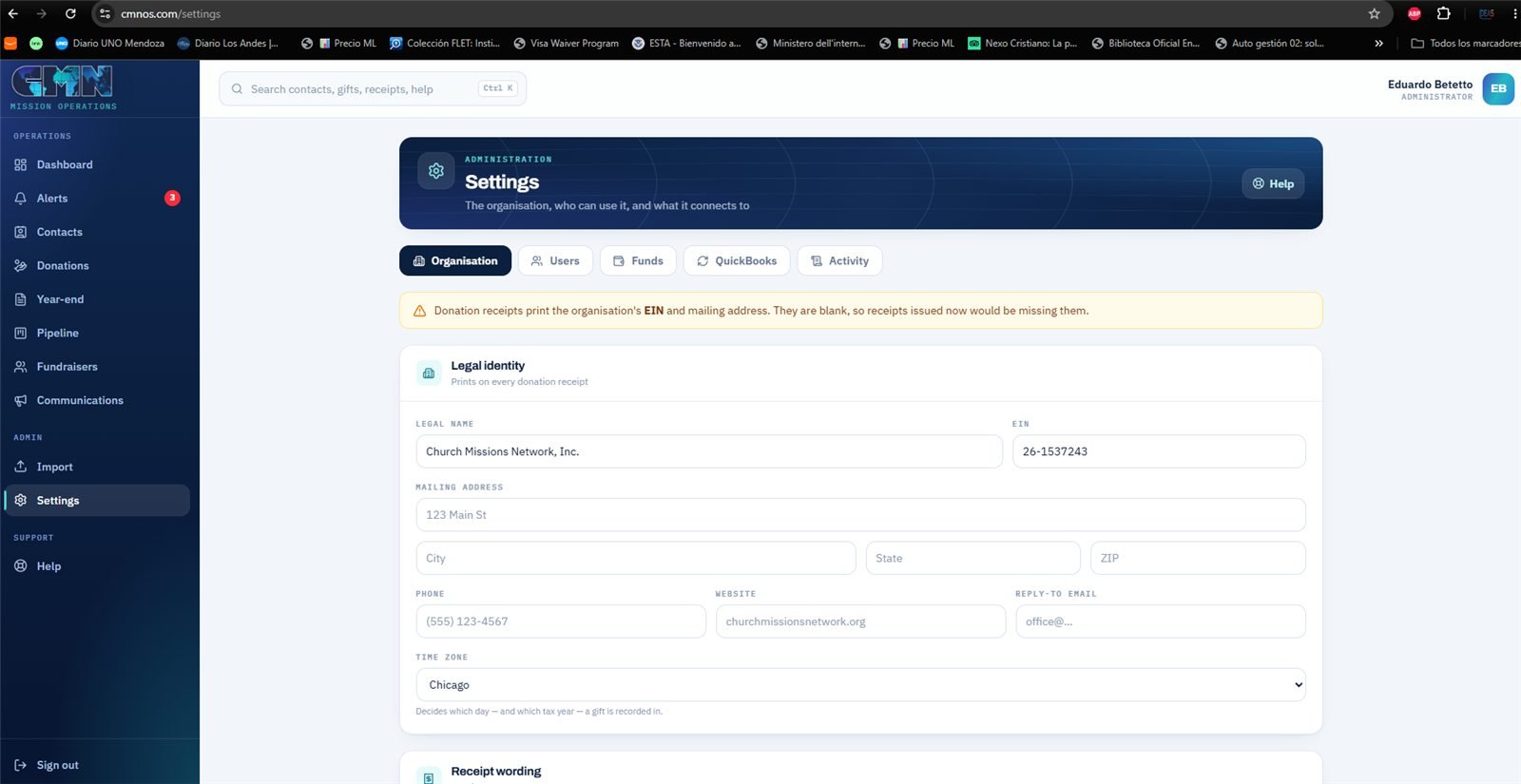
Settings — the legal identity printed on every receipt, and the other four tabs.
  • Organisation — legal name, EIN, address, the email that receives replies, and the acknowledgement text on the receipt (legal text, which CMN's accountant decides). The mailing address and the reply email are still empty: until they are filled in, every campaign shows a yellow warning. Also the giving page: open or closed, minimum and maximum amounts, and fees.
  • Funds — the funds a gift can be designated to (today General Fund and Kare 4 Kids).
  • Users — invite someone, change their role, suspend them or reset their password. If the person invited was already a contact, the invitation uses that same contact instead of creating another.
  • QuickBooks — connect the account, choose the date to bring receipts from, and see the history of every sync.
  • Audit — who changed what and when, across gifts, contacts, funds and access.
QuickBooks today

The tab is built and tested, but the account is not connected yet: zero syncs so far. It needs CMN to create the app in Intuit Developer.

ExplainHow the QuickBooks sync works

It works both ways

  • From here to QuickBooks — every Completed gift becomes a sales receipt in the donor's name.
  • From QuickBooks to here — sales receipts the accountant enters in QuickBooks come back as gifts.
  • Nothing is created twice: each gift remembers which QuickBooks receipt is its own.

When something changes

  • A corrected gift updates its receipt on the next sync.
  • A returned, failed or deleted one is voided in QuickBooks — voided, not deleted, so the books keep the record.
  • A pending one is not sent until the money arrives.

The limitation to know about

Only sales receipts come back. If CMN's accountant recorded gifts as bank deposits or journal entries, those do not come back on their own: they need a QuickBooks report brought in through Import. It is the first thing worth asking Lacey.

ExplainWhat each role can see
RoleWhat they can see and do
AdministratorEverything, including this section and who has access.
CMN OfficeDonors, gifts, receipts, campaigns, QuickBooks. Not Settings.
FundraiserOnly their own prospects, in Pipeline.
Field staffReserved for Phase 3 field reporting.
Team memberNothing yet: the waiting room for a new account.

The limit lives in the database, not on the screen

Hiding a button is not enough: someone with know-how could ask the server for the data directly. So the rule lives in the database. A Fundraiser who tried would get zero gifts and zero emails, and only the contacts of their own prospects. It was tested exactly that way, simulating a fundraiser's session.

12

Help

The manual inside the system

Every role

So the office does not depend on calling anyone when they cannot remember how something is done.

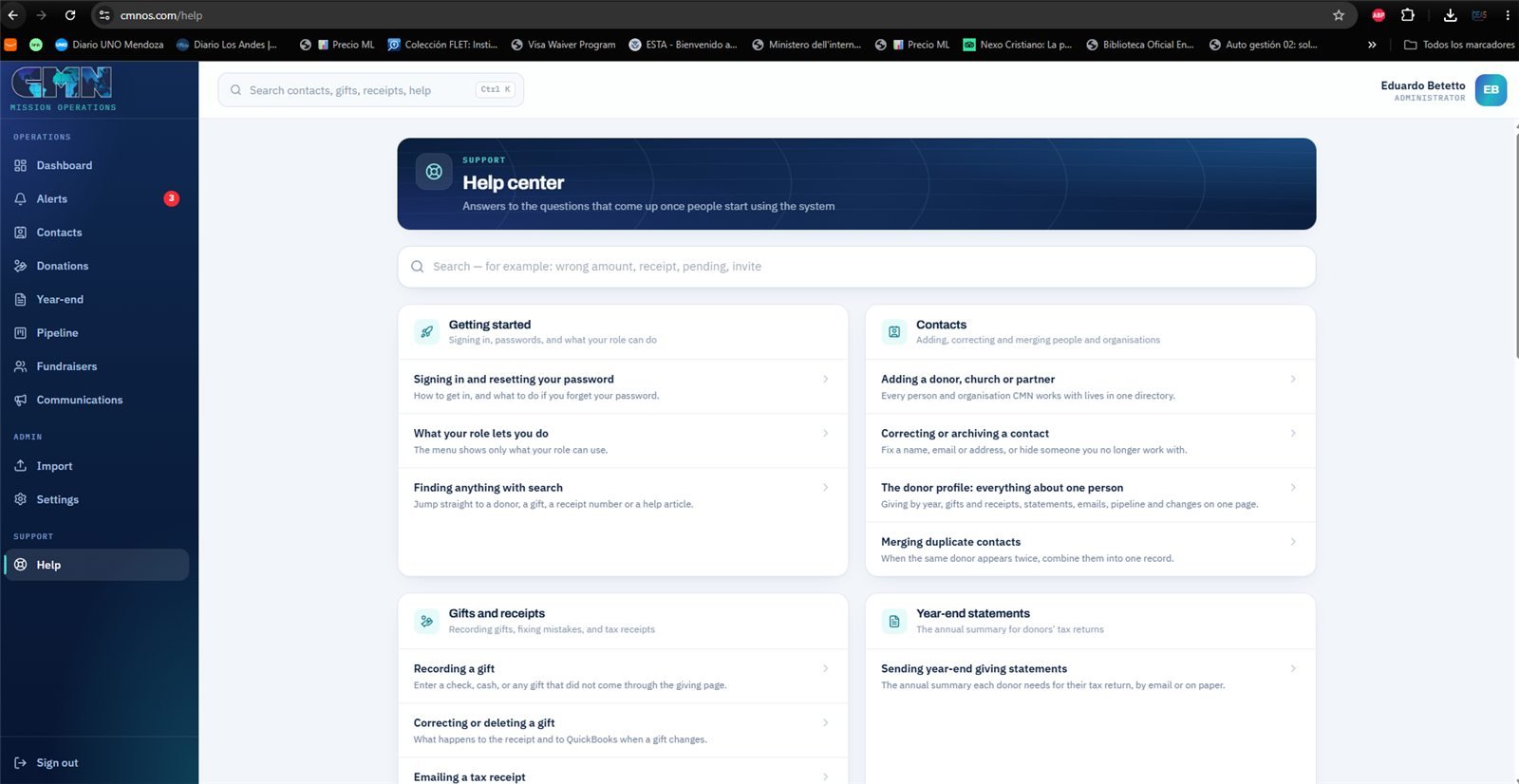
Help — articles grouped by topic, with a search of its own.
  • Articles by category, written in the words of whoever uses the system: "why a transfer says pending", "an email did not arrive", "merging duplicates".
  • Everyone sees only the articles for what their role can use. A fundraiser does not see instructions about tax receipts.
  • Almost every screen has a Help link at the top that opens the article for that screen.

Not in the menu

4 sections · opened from elsewhere

They are not in the side bar, and they are the ones most often missed when showing the system. Two of them — the donor record and the giving page — are among its most important pieces.

13

Donor record

Opens by clicking any name

AdministratorCMN OfficeNot in the menu

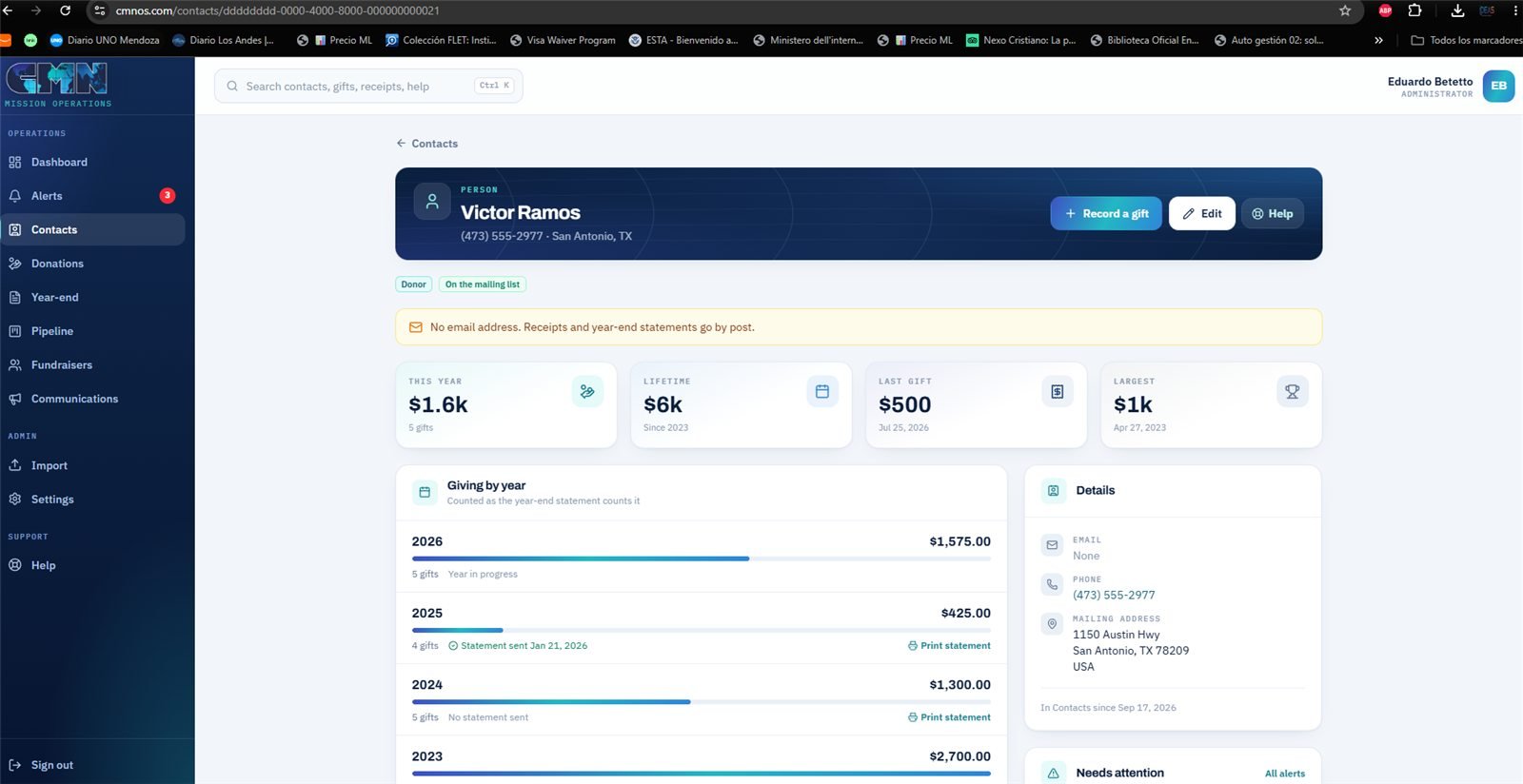
Everything about one person on one page. What to open before picking up the phone to call a donor.

Donor record — what they gave each year, the letters already sent, and at the top the notice that they have no email, so their receipt goes by post.
  • What they gave each year, to see at a glance whether they are growing, cooling off or have stopped giving.
  • Every gift with its receipt, the year-end letters sent to them, and the emails they received.
  • Their pipeline card if they are being developed, and the alerts that concern them.
  • If their email address was suppressed after bouncing, it says so right there — instead of someone finding out three months later that nothing ever reached them.
  • If the contact is the result of merging duplicates, a notice explains it, so nobody is surprised by gifts that "weren't theirs".
  • The Email button writes to that one person: a thank-you, a follow-up after a visit. It goes out on CMN's letterhead but in the name of whoever writes it, and replies come back to that person, not to an inbox nobody reads. It stays on the record with the full text and the name of who sent it.
  • Merge with… merges this record with another one of the same donor that the system did not catch.
14

Giving page

cmnos.com/give · public, no account needed

Any donorNot in the menu

Where the donor gives. The only part of the system people outside see, and the one that turns a gift into a record without anyone typing it.

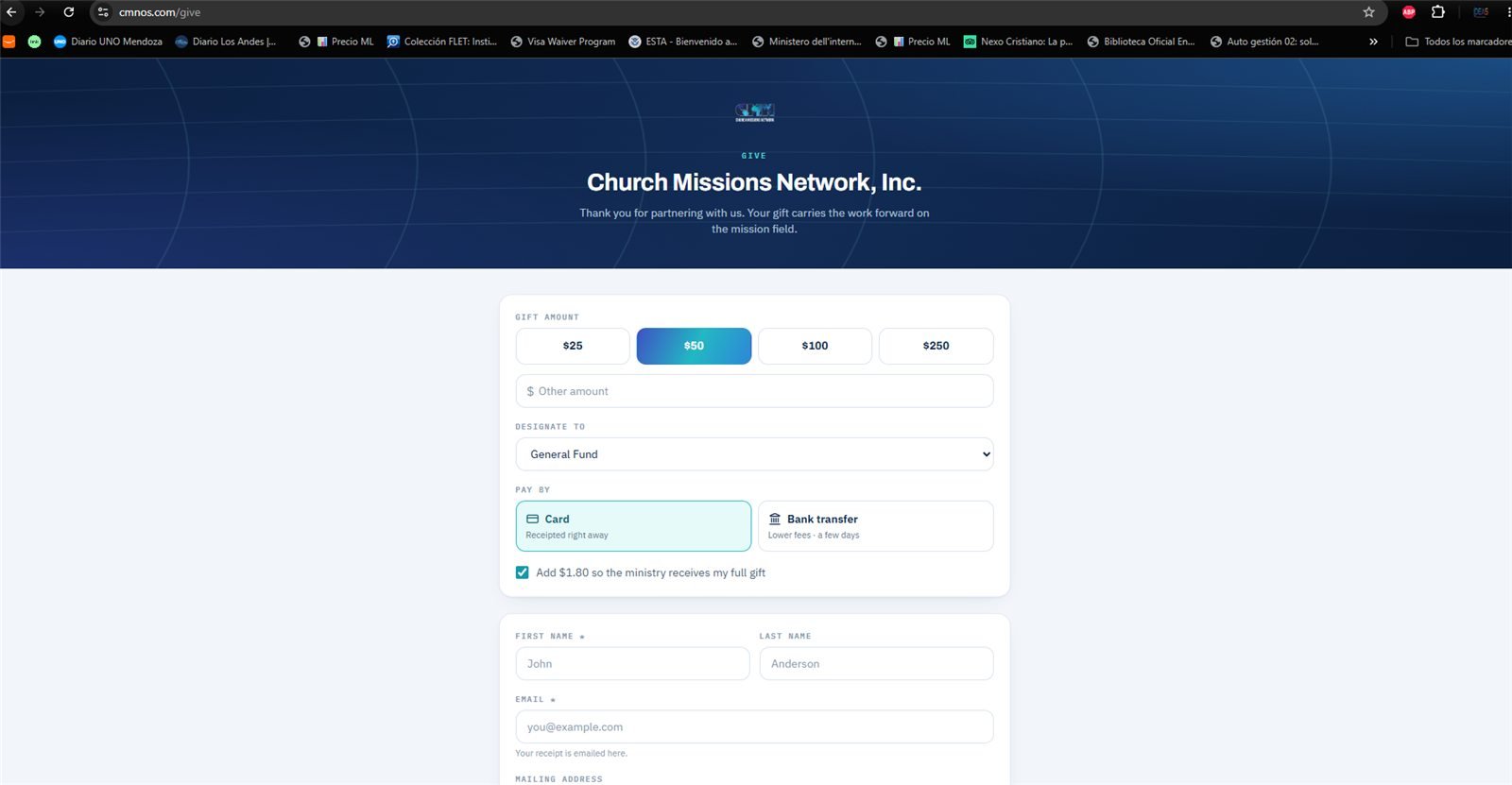
The public giving page, with the fee the donor can choose to cover.
  • The donor chooses the amount, the fund and the payment method: card or bank transfer. They can also cover the fee so the ministry receives the whole gift.
  • Card: clears instantly and the receipt goes out on its own, in the same second.
  • Bank transfer (ACH): comes in as Pending and the donor right away gets a notice that their gift is being processed. The day the bank confirms, it becomes Completed and only then does the receipt go out.
  • A link can bring the fund already chosen — they are all in Public links.
  • The fee shown is what Stripe actually charges: 0.8% capped at $5 for a bank transfer, against 2.9% + 30¢ for a card. On a $40 gift the difference is $0.32 against $1.50.
  • If the donor's email is already in the database, the gift is added to their contact instead of creating a new one.
Lives alongside other platforms

CMN's Stripe account is also used by GiveSuite. Every gift born on this page carries its own mark, and the system ignores anything without it. Otherwise every charge from the other platform would come in here as a duplicate gift and send that donor a second receipt.

ExplainHow the fee the donor covers is calculated

Stripe takes its percentage on everything that goes through the charge — including the part the donor adds to cover the fee. If the system simply added 2.9%, Stripe would charge a fee on that addition too, and CMN would receive a few cents less than the gift.

So the math runs backwards: it finds the total that, after Stripe keeps its share, leaves exactly the whole gift.

GiftBy card2.9% + 30¢By bank transfer0.8%, $5 cap
$40+ $1.50+ $0.32
$50+ $1.80+ $0.40
$1,000+ $30.18+ $5.00

The $40 row is not theoretical: it is the real test run with Stripe. The donor added $0.32, Stripe charged $0.32, and CMN received exactly $40.00.

The cap on bank transfers is what makes the difference on large gifts: at $1,000, a card costs six times more.

15

Search

Ctrl K from any screen

Every roleNot in the menu

Reach anything without walking the menu. Most useful when a donor is on the phone and you need to find them now.

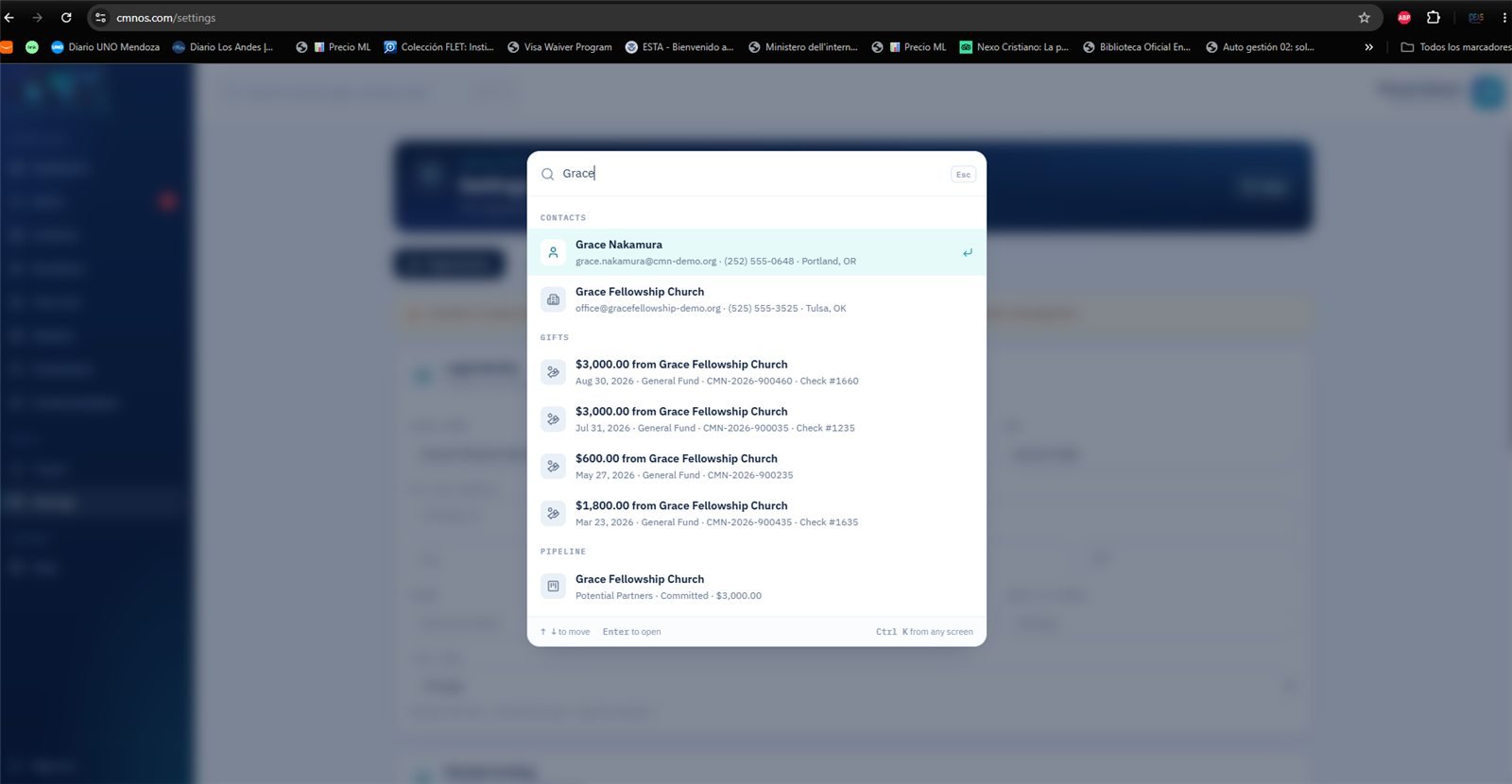
Search with Ctrl K: one word returns contacts, gifts and prospects.
  • Type whatever you know: a name — or first and last name together — part of an email, a phone number, a receipt number (CMN-2026-000002), a check number or an exact amount such as 250.
  • Returns contacts, gifts, prospects, screens of the system and help articles, grouped by type.
  • Everyone sees only what their role allows.
16

Export to Excel

Export button in Contacts, Donations and Year-end

AdministratorCMN OfficeNot in the menu

For when the question comes from outside the system: the accountant, the board, an audit, a foundation asking for numbers.

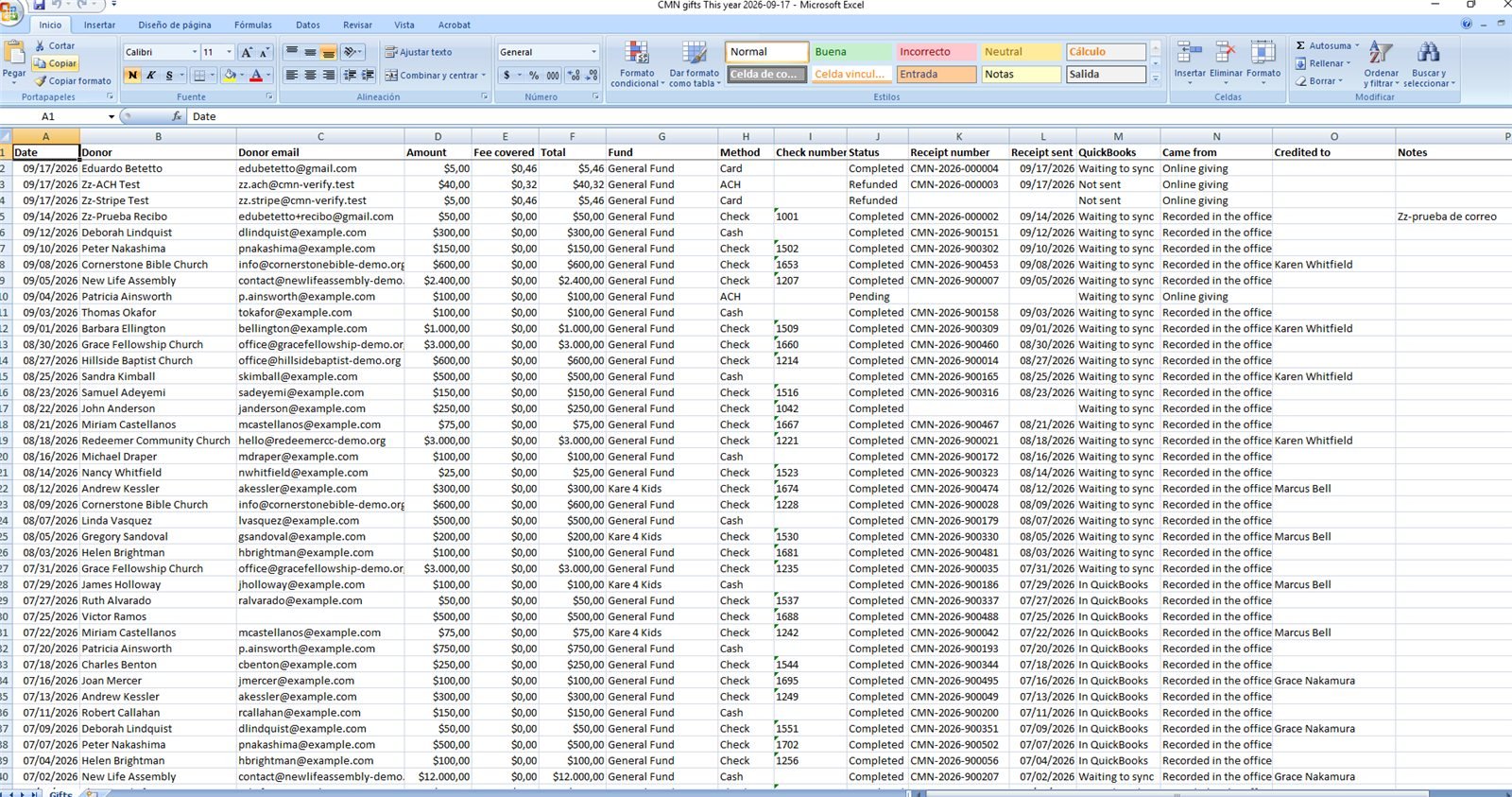
The file Donations downloads, opened in Excel: amounts as currency and one column per detail.
  • Downloads a real .xlsx file, not a disguised CSV: amounts already come as currency and the header row stays fixed while scrolling.
  • Exports what is filtered on screen. If you are looking at this year's General Fund, that is what downloads — not the whole database.

Where things stand

All sixteen sections are built and working at cmnos.com. What remains is not programming: it is reviewing, connecting and deciding.

Everything runs in test mode today. Online giving has been tested end to end — card, bank transfer, fees, automatic receipts, refunds and alerts — in Stripe's test environment, where no real money moves. The donors, churches, gifts and campaigns you see inside are sample data, there to show every piece working. QuickBooks is built but not connected yet: it needs CMN to create the app in Intuit Developer.

Going live happens in this order, and only after you sign off:

  1. You review the system and tell us anything that is not right.
  2. CMN provides its mailing address and the email for donor replies — both appear on every receipt — and decides whether to turn on opens and clicks for campaigns.
  3. Stripe switches to CMN's live account, and QuickBooks is connected.
  4. The sample data is cleared and the real donor history comes in.
  5. Last of all, the Give button on the website points here.

Until that last step, CMN's current giving setup keeps working exactly as it does today.

CMN Mission Operations · cmnos.com
As of September 18, 2026